
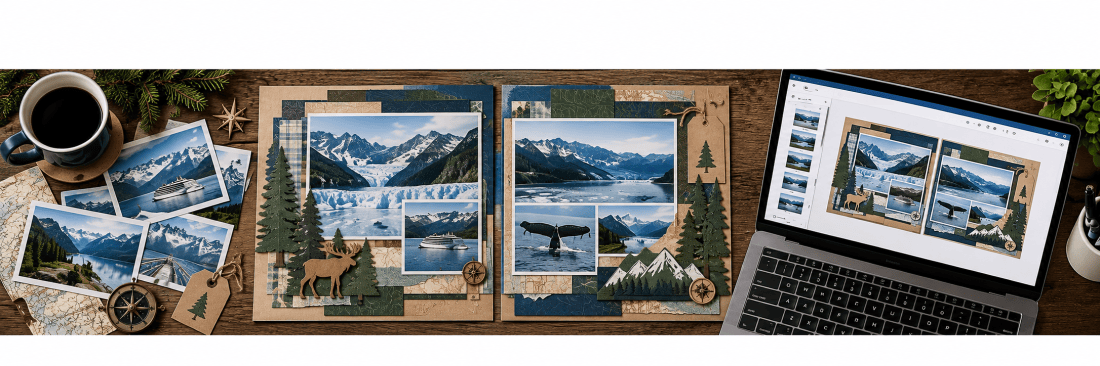
ChatGPT and Scrapbooking: An Unexpected Creative Partnership
AI in the Scrapbook Room: Article 1
I’ve been scrapbooking for many years, and one of the things I have always enjoyed about this hobby is finding new ways to be creative. Whether it is experimenting with different papers, finding unusual embellishments, incorporating memorabilia, buying (and sometimes using) a new tool, or learning a new technique with my Cricut, I am always looking for ways to make my scrapbook pages a little more interesting.
Recently, however, I discovered a new creative tool that I never really expected to use for scrapbooking: artificial intelligence, or AI.
Now, AI itself is not new to me. I use it extensively in my professional work and for a variety of personal projects. I have become quite comfortable asking questions, working through ideas, researching information, and using it to help solve problems. But for some reason, I had never really considered what it might contribute to my scrapbooking. That changed during a recent cruise to Alaska.
While enjoying our cruise, I started thinking about some scrapbook layouts I wanted to create to document the trip. I wondered whether AI might be able to help me develop some design ideas. So, despite the rather poor internet connection aboard the cruise ship, I decided to give it a try.
I started experimenting with ChatGPT, describing some of the ideas I had for my scrapbook pages and asking it to help me think through different designs. I really wasn’t sure what to expect, but I was amazed by what happened.
It wasn’t that AI was suddenly doing my scrapbooking for me. Instead, it was helping me think creatively in ways I hadn’t considered. I could describe an idea, receive a suggestion, make adjustments, and continue refining it through a conversation. Sometimes it would suggest something I hadn’t thought of, and other times its suggestions would inspire an entirely different direction. What fascinated me most was how naturally it complemented my own creativity.
I have always believed that scrapbooking is about much more than putting photographs on paper. It is about telling stories, preserving memories, and creating something that reflects our individual personalities and experiences. The choices we make about colors, papers, embellishments, photographs, and journaling are all part of that creative process.
AI doesn’t have those memories or experiences. It wasn’t there when the photographs were taken, and it doesn’t know why a particular moment matters to me unless I explain it. But it can help me explore different ways to represent those memories on a scrapbook page. And that is where I began to see its potential.
Since returning from Alaska, I have been experimenting quite a bit more. I’ve explored using AI to help develop scrapbook layouts, select colors, create custom graphics and embellishments, and work through design challenges. Some experiments have been remarkably successful, while others have required quite a bit of patience and repeated adjustments.
I’ve also discovered that the way you communicate with AI makes an enormous difference. Learning how to describe what you want, explain what isn’t working, and refine the results is a skill in itself. The more I experiment, the more possibilities I discover.
I certainly don’t consider myself an expert, and I suspect that I will continue learning new things for quite some time. However, I think I have experimented enough, made enough mistakes, and discovered enough useful techniques that it is time to begin sharing some of what I have learned.
So, I am starting a new series here on MAScrapping that I am calling AI in the Scrapbook Room.
Over the coming months, I plan to share some of the ways I have been incorporating AI into my scrapbooking. We’ll explore everything from generating creative ideas and choosing color schemes to designing custom embellishments, working with Cricut Design Space, and using AI to help tell the stories behind our photographs.
I also plan to share the things that don’t work particularly well. AI is far from perfect, and sometimes getting the result you want can be a frustrating process. I think there is just as much value in sharing those experiences as there is in celebrating the successes.
And there are certainly some larger questions worth considering. What does it mean to use artificial intelligence in a hobby that is so personal and creative? What about the artists who design the supplies we purchase? What are the environmental and ethical implications of using AI? These are important questions, and I intend to explore them as part of this series rather than ignore them.
My goal isn’t to convince everyone that they need to use AI in their scrapbooking. There are countless ways to enjoy this hobby, and that variety is one of the things that makes it so wonderful. Instead, I simply want to introduce another creative tool that you might find useful.
Want to Follow Along? Here’s How to Get Started.
If you haven’t experimented with artificial intelligence before, you might be surprised at how easy it is to begin. You don’t need to know anything about computer programming or have extensive technical skills. Most AI programs allow you to communicate in ordinary conversational language, much like you would when asking another person for advice.
There are several AI platforms available, including:
- ChatGPT by OpenAI, which can help with brainstorming, writing, research, image creation, and many other creative activities.
- Google Gemini, Google’s AI assistant, which offers conversational assistance, research, and creative tools.
- Microsoft Copilot, which provides AI assistance for questions, writing, research, and image creation.
- Claude by Anthropic, another conversational AI platform that is particularly useful for writing, analyzing information, and developing ideas.
These are not the only options available, and each has its own strengths and limitations. The technology is also changing remarkably quickly, so the features available today may be different a few months from now.
The good news is that you don’t have to pay to get started. All four platforms offer free access, although some features and usage are limited. Paid subscriptions generally provide additional capabilities, higher usage limits, and access to more advanced tools.
For this series, I will primarily be using ChatGPT, and I want to be transparent that I subscribe to its paid Plus version. I use AI frequently enough in my professional and personal life that the additional capabilities are worthwhile for me. In particular, I appreciate the expanded access to image generation and other tools that allow me to experiment more extensively with scrapbook designs.
However, you certainly do not need to purchase a subscription just to begin exploring AI. The free version of ChatGPT is a perfectly reasonable place to start, including for experimenting with creative ideas and limited image generation.
If you would like to follow along with this series, I encourage you to choose one of these platforms and spend a little time getting acquainted with it. My suggestion would be to start with ChatGPT, simply because that is what I will be using in most of my demonstrations. That way, it will be easier to follow the examples and try some of the techniques yourself.
You can get started at chatgpt.com.
Don’t worry about understanding everything immediately. Start by asking a question, describing a scrapbook page you are working on, or requesting some creative ideas. Experiment a little and see what happens.
In future articles, I’ll walk through specific examples of how I use ChatGPT, including the instructions I give it, the results it produces, and how I turn those results into actual scrapbook projects. For some of these articles, I also plan to create video demonstrations so you can watch the process unfold.
I hope you’ll join me on this journey as we explore how artificial intelligence can become another tool in our scrapbooking toolbox. I suspect we’ll discover some wonderful possibilities along the way, and probably have a few laughs at some of the unexpected results!
Categories: AI Tips and Tricks, Articles

