
Using ChatGPT to Create Themed Scrapbook Backgrounds
AI in the Scrapbook Room: Article 21
One of the challenges of scrapbooking is finding background paper that really matches your photographs. There are thousands of patterned papers available, but sometimes none of them quite captures the experience you’re trying to preserve.
That’s where ChatGPT can help. Instead of searching for paper that comes close to what you want, you can create a background specifically for your scrapbook page.
For this example, I’m going to use a recent experience from my Alaska cruise.
Creating a Background That Matches My Memories
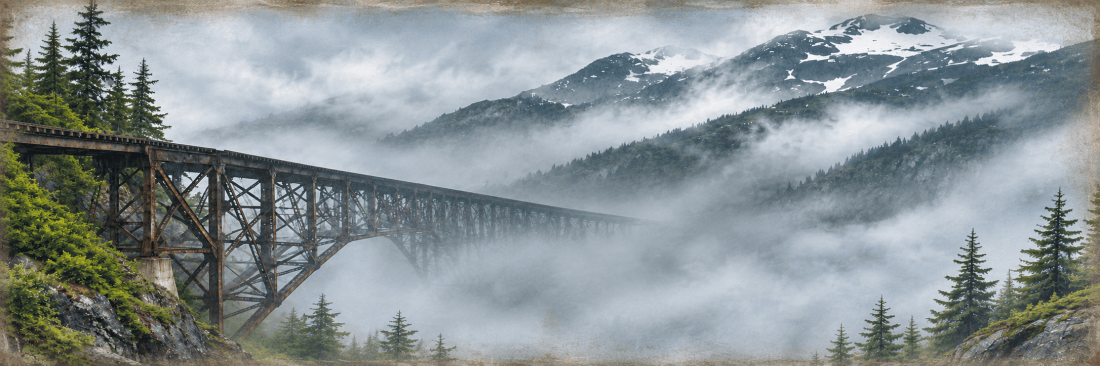
During my trip to Skagway, Alaska, I rode the historic White Pass & Yukon Route Railroad. One of the fascinating sights along the route is an abandoned steel cantilever bridge, built in 1901, that once carried trains across a deep mountain gorge.
Unfortunately, when we reached that part of the journey, it was extremely foggy. The mountains and bridge were partially obscured by the mist. Now, I could certainly find beautiful railroad-themed scrapbook paper featuring mountains, trains, and dramatic scenery. But that wouldn’t really reflect what I experienced that day.
Instead, I want to create background paper that captures the foggy atmosphere of my actual trip.
Step 1: Creating a 12×12 Background
I’ll start by asking ChatGPT to create a single scrapbook background.
Here’s my first prompt:
Create a 12×12 scrapbook background featuring the abandoned steel cantilever bridge on the White Pass & Yukon Route Railroad near Skagway, Alaska. Surround it with thick fog and misty mountains. Use muted grays, greens, and blues.
I’m hoping for a background that features the bridge emerging from the fog, with enough subtle detail to complement my photographs without overwhelming them.
What makes this different from purchasing generic Alaska-themed paper is that I’m creating something connected to the conditions I actually experienced.
Step 2: Expanding the Design into a Double-Page Spread
Most of my scrapbook layouts are double-page spreads, so a single 12×12 background isn’t always enough.
Rather than creating a completely different background for the second page, I can ask ChatGPT to expand the original design into one continuous scene.
Here’s my second prompt:
Expand this design into two side-by-side 12×12 scrapbook backgrounds, creating one continuous 12×24 scene. Keep the bridge and fog consistent across both pages.
This should give me a coordinated design that flows across both pages of my scrapbook. The goal is to have the mountains, bridge, and fog continue naturally from the left page to the right, rather than having two separate images that don’t quite match.
I’ll still need to examine the result carefully, particularly where the two pages meet. ChatGPT may not produce perfectly aligned edges or exact print dimensions on the first attempt.
Printing and Using Your Backgrounds
Of course, not everyone has a printer capable of printing 12×12-inch scrapbook paper. Some wide-format printers can handle this size, and professional printing services are another option. (Note: I ordered this to be printed from https://scrapbookcustoms.com/p/-print-my-digital-file-12×12-custom – and I will let you know how it turns out).
But you don’t necessarily need to print the entire background at 12×12. You can print your design on standard letter-size paper and layer it with coordinating cardstock or patterned paper to create a full 12×12 scrapbook page. You might use the printed background as a large decorative panel, frame it with cardstock, or incorporate portions of the image into your layout.
This gives you plenty of flexibility without purchasing a new printer.
We’ll explore creating graphics with precise dimensions in a later article. For now, I’m concentrating on the creative possibilities.
Creating Backgrounds That Tell Your Story
What I particularly like about this technique is that I’m not trying to make my Alaska photographs look like they were taken on a beautiful, sunny day. The fog was part of the experience, and I want my scrapbook to reflect that.
By creating my own background, I can capture the atmosphere of that particular moment rather than settling for a generic railroad or mountain design.
And that’s one of the exciting possibilities of using AI in scrapbooking. We can create papers that complement not just the subject of our photographs, but the memories and experiences behind them.
In the next article, we’ll explore another way to turn recognizable landmarks into custom scrapbook graphics.
Categories: AI Tips and Tricks, Articles

