
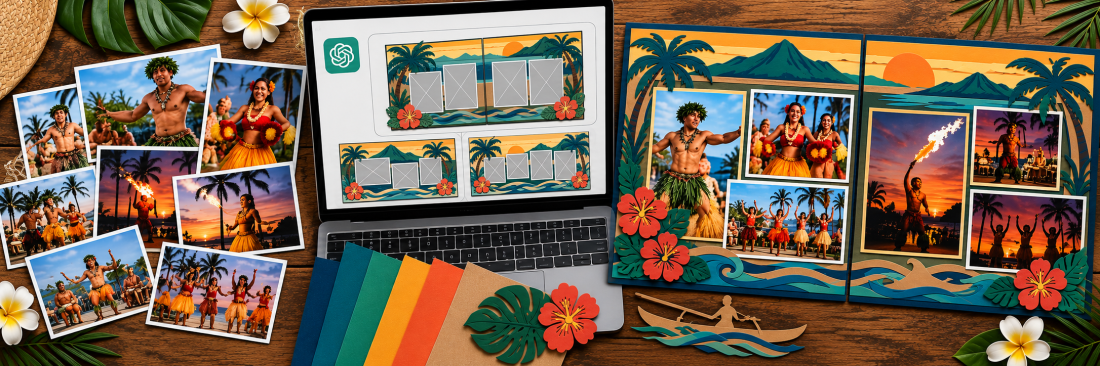
Creating Coordinated Two-Page Scrapbook Spreads with AI
AI in the Scrapbook Room: Article 12
One of the things I enjoy most about scrapbooking is creating double-page spreads. Most of my scrapbooks use 12×12-inch pages, and I frequently design two facing pages together as one 12×24-inch layout. That gives me plenty of room for photographs, titles, embellishments, and occasionally some memorabilia I’ve collected along the way.
But designing two pages together also presents some challenges. I want the pages to look like they belong together without necessarily making them identical. I want the photographs to tell the story, but I also want the overall design to be visually interesting. And, of course, everything eventually has to fit on two actual pieces of cardstock.
In previous articles in my AI in the Scrapbook Room series, we’ve explored using ChatGPT to brainstorm layouts, solve design problems, and create custom scrapbook titles. This time, we’re going to bring several of those techniques together to develop a coordinated double-page spread.
And rather than inventing a hypothetical project, I’m going to use something I’m actually working on.
During a trip to Hawaii, I attended a luau and took photographs of the dancers performing throughout the evening. Some of the pictures were taken in bright sunlight, while others were taken as the sun was setting. I have approximately eight to ten photographs that I’m considering, but I haven’t decided which ones to use or how to arrange them.
That’s where we’re going to begin. We’ll work through five progressive prompts, starting with the photographs themselves and eventually developing a layout that I can recreate using cardstock and my Cricut.
I’ve included a video at the bottom of this article showing the entire process. You can watch the demonstration straight through or pause after each step to try the prompts with your own photographs. The video chapters correspond to the sections below, making it easy to follow along.
Step 1: Choosing Which Photographs to Use
Before I can design a layout, I need to decide which photographs deserve a place on the pages. This is sometimes harder than it sounds.
I might have several photographs of the same dancer, each taken just a few seconds apart. One might have better lighting, another might capture a more interesting pose, and a third might simply remind me of something I particularly enjoyed about the performance.
I don’t necessarily want to use every photograph. But I also don’t want to select pictures based entirely on technical quality. Scrapbooking is about preserving memories, and sometimes the photograph that means the most isn’t the one that would win a photography contest.
For this project, I’m going to upload ten photographs to ChatGPT and ask it to help me evaluate them as a group.
Prompt 1: Choosing the photographs
I’m creating a 12×24-inch double-page scrapbook spread about a luau I attended in Hawaii. I’m uploading 10 photographs of dancers performing in daylight and at sunset. Help me select the strongest combination of photographs for the spread. Consider storytelling, visual variety, lighting, composition, and how the photographs might work together. Use a visual numbering system to identify the photographs, explain your recommendations, and suggest which should be featured most prominently. Don’t design the layout yet. I want to decide which photographs to use before we begin arranging them.
I particularly like including that last instruction. We’re breaking the project into manageable decisions rather than asking ChatGPT to do everything at once.
I also want to pay attention to why ChatGPT recommends particular photographs. Perhaps one image has a strong focal point, while another provides a wider view of the performance. Maybe two pictures are so similar that we really only need one.
Ultimately, though, I’m still making the final decision. ChatGPT doesn’t know which moments were most meaningful to me, and I may choose to include a photograph for reasons that have nothing to do with its visual composition.
Once I’ve selected the photographs, we’ll move on to arranging them.
Step 2: Creating an Initial Double-Page Layout
Now that we’ve narrowed down the photographs, it’s time to see how they might fit together. I typically print my photographs at 4×6 inches, although I sometimes crop them or use different sizes when the layout calls for it. For this exercise, I want ChatGPT to begin with the actual dimensions and orientations of the photographs I’ve selected.
One thing I’ve learned from experimenting with AI-generated scrapbook layouts is that you need to be specific about what you want to see. If I simply ask for a scrapbook layout, ChatGPT may create an attractive picture that doesn’t accurately represent the dimensions of the photographs or the pages. It might even invent additional pictures or change the content of the originals.
That’s not particularly helpful when I’m trying to plan something I can actually assemble.
Instead, I want a visual layout sketch that respects the proportions of two 12×12-inch pages and the photographs I’m planning to use.
Prompt 2: Creating the initial layout
Using the photographs we’ve selected, create a visual layout sketch for a 12×24-inch double-page scrapbook spread consisting of two 12×12-inch pages. Use the actual photographs I’ve uploaded as references, and respect their orientations and proportions. Assume the photographs will initially be printed at 4×6 inches unless we identify a reason to use a different size. Show how the photographs could be arranged across both pages, leaving appropriate space for a title and embellishments. Make the photographs the primary focus of the layout. Do not invent additional photographs or change the content of my pictures. If you use placeholders instead of the actual images, label them clearly so I can identify which photograph belongs in each position.
At this point, I’m not particularly concerned about decorative elements. I want to see whether the basic arrangement works. Are the photographs balanced across the two pages? Is there enough space around them? Does one photograph deserve to be larger than the others? Does the layout feel crowded, or are there areas that seem unusually empty?
I also want to look carefully at the center of the spread. Although I’m designing a 12×24-inch composition, the finished project will consist of two separate 12×12-inch pages. I don’t want an important part of a photograph or title to disappear into the gap between them.
The first sketch is simply a starting point. We may decide to change almost everything about it as we continue.
And remember, AI-generated sketches aren’t always dimensionally accurate. I’ll eventually verify the measurements in Cricut Design Space before cutting anything.
Step 3: Exploring Different Ways to Coordinate the Two Pages
This is where I think the process gets particularly interesting. We now have a group of photographs and an initial arrangement, but that doesn’t mean we’ve found the best design.
One of the challenges of double-page scrapbooking is creating two pages that feel connected. That doesn’t necessarily mean they need to be symmetrical or have identical numbers of photographs. Sometimes a spread works better when one page has a strong focal image and the other contains several supporting photographs.
For my luau photographs, there are several possibilities worth exploring. Some pictures were taken in daylight and others at sunset, but I don’t necessarily want to organize the pages chronologically. Perhaps the strongest arrangement will come from balancing the colors, grouping similar performances, or emphasizing one particularly dramatic photograph.
Rather than deciding that in advance, I’m going to ask ChatGPT to explore some alternatives.
Prompt 3: Exploring alternative compositions
Look at the double-page scrapbook layout we’ve developed so far. Suggest three different ways to make the two pages feel like one coordinated design. Consider the arrangement of photographs, visual balance, focal points, colors, and how the viewer’s eye moves across the spread. Create a visual sketch of each alternative using the same selected photographs. Explain the advantages of each approach, but don’t assume that the photographs need to be arranged chronologically.
What I like about this prompt is that we’re asking ChatGPT to help us think through design choices rather than simply produce another attractive picture. Perhaps one option will use a larger photograph as the focal point. Another might create a more balanced arrangement across the two pages. A third could use the different lighting conditions as part of the composition.
I may like elements from more than one suggestion. If so, I can ask ChatGPT to combine them. For example, I might say, “I prefer the photograph arrangement in the second option, but I like the balance between the two pages in the third. Can you combine those approaches?”
This is one of the advantages of working through a conversation. I can respond to what I see, explain what I like or dislike, and gradually move toward a design that reflects my preferences.
There’s no reason to accept the first layout simply because ChatGPT generated it.
Step 4: Developing a Coordinated Color Scheme and Embellishments
Once I’m satisfied with the general arrangement of the photographs, I can begin thinking about the decorative elements.
For this project, the photographs already contain a great deal of color. The dancers’ costumes, the surroundings, and the changing light all contribute to the visual character of the pictures. I don’t want to introduce so many additional colors and graphics that the photographs get lost.
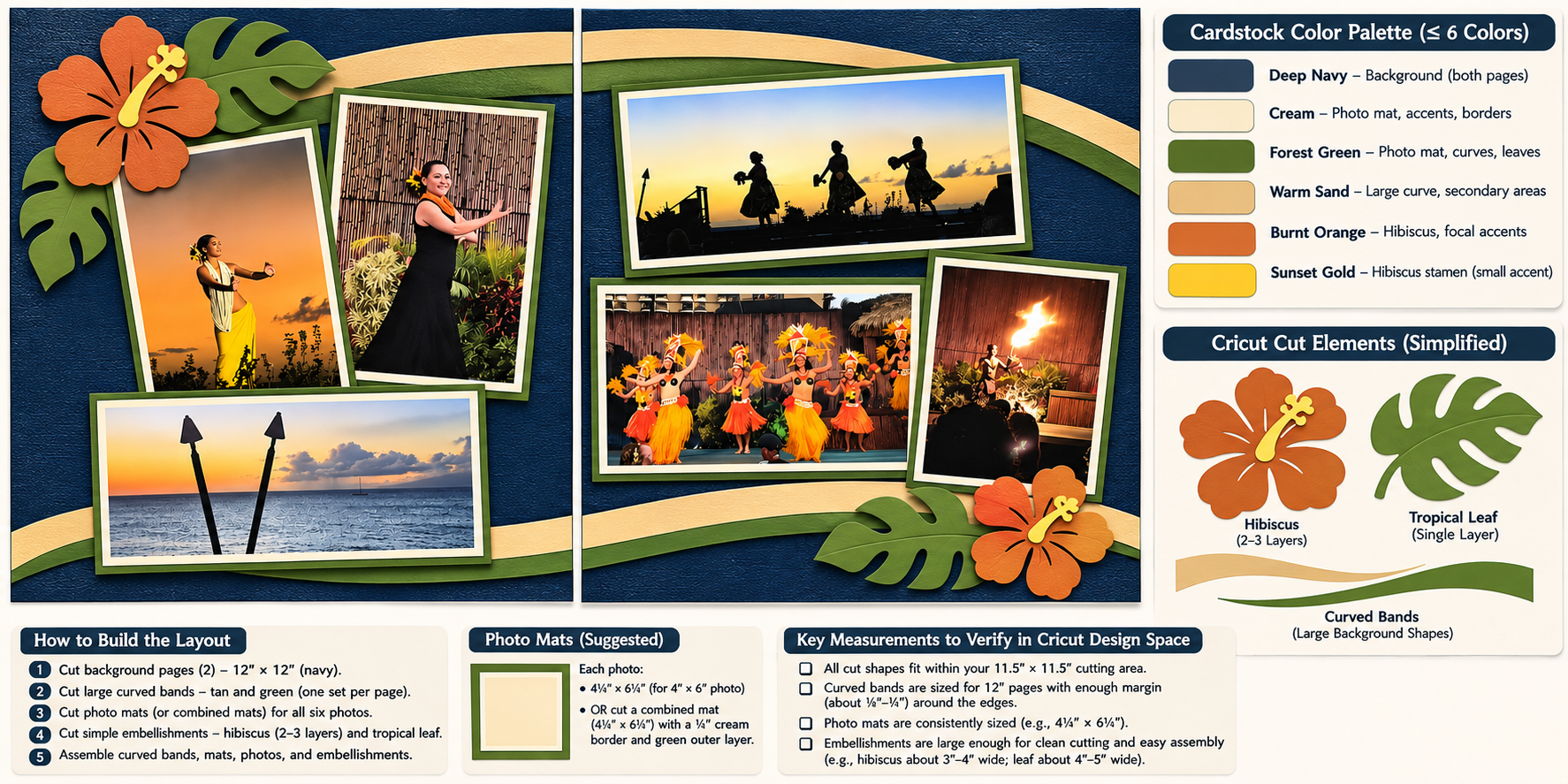
Instead, I want ChatGPT to help identify a relatively small group of cardstock colors that will complement the photographs and connect the two pages. I also want to explore Hawaiian-inspired embellishments that might work with the layout. Depending on the design, these could include tropical foliage, simple waves, a canoe, or other elements that reflect the experience.
Since I generally create my embellishments using cardstock and my Cricut, I prefer bold, relatively simple shapes rather than highly detailed illustrations.
Prompt 4: Adding colors and embellishments
Using the double-page layout we’ve selected, suggest a coordinated cardstock color palette based on the photographs. Limit the palette to no more than six colors, and consider how the colors will work with both the daylight and sunset photographs. Then create a revised visual layout showing how simple Hawaiian-inspired embellishments, borders, or background shapes could help connect the two pages. Keep the design masculine, use bold shapes suitable for cutting from cardstock, and avoid overwhelming the photographs. Preserve the photograph arrangement we’ve already selected unless you explain why a change would improve the layout.
Notice that I’m asking ChatGPT to preserve the decisions we’ve already made. Without that instruction, AI sometimes changes the entire design when you ask it to add something relatively small. I don’t want to spend time selecting photographs and developing a composition only to have everything rearranged when we introduce a few embellishments.
I also want to see whether the decorative elements actually contribute to the design. Sometimes a simple border or a shape that continues across both pages is enough to create visual continuity. Other times, a larger embellishment may help fill an awkward space or provide a natural place for the title. And sometimes the best decision is to leave an area alone.
One of the things I appreciate about using ChatGPT is that I can ask it to show me different possibilities before committing to cutting anything.
Step 5: Refining the Design for Cardstock and Cricut Design Space
At this point, we should have a reasonably complete visual concept for our double-page spread.But there’s still a difference between a design that looks good on a computer screen and one that I can actually construct.
I need to make sure the photographs fit, the embellishments are practical to cut, and the design works across two separate 12×12-inch pages. I also need to consider how the pieces will be assembled. Some shapes might be cut as individual embellishments, while others could become larger cardstock mats that surround several photographs.
That’s something I frequently do in my scrapbooking. Rather than placing every photograph on its own separate mat, I sometimes create a larger cardstock shape that incorporates multiple photographs and decorative elements into one coordinated design.
For the final prompt, I want ChatGPT to help simplify the layout and identify anything that might be difficult to reproduce.
Prompt 5: Preparing the layout for construction
Review our selected 12×24-inch double-page scrapbook design and help me prepare it for construction using cardstock and Cricut Design Space. Preserve the photograph arrangement and overall design we’ve developed. Simplify any embellishments that would be difficult to cut from cardstock, eliminate unnecessarily small pieces, and keep the number of layers manageable. Remember that the spread consists of two separate 12×12-inch pages and that my Cricut has a maximum cutting area of approximately 11.5×11.5 inches. Create a final visual layout showing the two pages together, and explain which design elements could be cut as individual embellishments, larger background shapes, or combined cardstock photo mats. Identify any areas where I should verify dimensions or make adjustments in Cricut Design Space before cutting.
This final step is particularly important because it connects the creative design process with the practical work of making the scrapbook pages. I don’t expect ChatGPT to produce a perfectly measured cutting plan. Instead, I want it to help identify the elements I need and how they might fit together.
I’ll use Cricut Design Space to establish the actual page dimensions, position my photographs, and develop the shapes that will eventually become cardstock pieces. I frequently use the Guide feature in Cricut Design Space to create a 12×24-inch reference area for my double-page spreads. I also create guides representing my photographs so I can see exactly where everything will fit.
Once those elements are positioned, I can create photo mats, incorporate embellishments, and use the Offset feature to develop larger shapes around groups of photographs and decorative elements.
This is where I move from ChatGPT’s visual suggestions to the actual design work that will make the spread possible.
What I Hope to Learn from This Project
One of the reasons I wanted to use a real scrapbook project for this article is that I don’t know exactly what the finished pages will look like yet. I have the photographs, I know the story I want to preserve, and I have some ideas about the kinds of graphics that might work. But I haven’t made all the design decisions. That’s precisely why I think this is a useful example.
We’re not asking ChatGPT to create a finished scrapbook spread and then blindly copying it. We’re using it to help us work through a series of decisions: which photographs to include, how to arrange them, how to coordinate the pages, and how to make the design practical to construct. Some of ChatGPT’s suggestions may be excellent. Others may not work at all.
I may reject a photograph it recommends, prefer a different layout, or decide that an embellishment is simply too complicated to cut. That’s all part of the process. The creative decisions still belong to me. ChatGPT is providing additional ideas and helping me visualize possibilities that I might not have considered.
And because we’re working with actual photographs and a real scrapbook project, we’ll also get to see some of the limitations of AI. It may misunderstand the dimensions, alter a photograph in a mockup, or suggest a shape that isn’t practical to cut. Those are things we can identify and correct as we go.
From a Collection of Photographs to a Coordinated Spread
We started this project with ten photographs from a Hawaiian luau and no final layout. Through five progressive prompts, we’ve asked ChatGPT to help select the photographs, develop an initial arrangement, explore alternative compositions, coordinate colors and embellishments, and refine the design for construction.
You can use this same process for almost any double-page scrapbook project. It might be photographs from a family vacation, a graduation, a sporting event, a holiday celebration, or an ordinary afternoon that deserves to be remembered.
The subject doesn’t matter nearly as much as the process. Start with the photographs and the story you want to tell. Let ChatGPT suggest possibilities, but don’t hesitate to question its recommendations or ask for something different.
For me, the value of AI in scrapbooking isn’t that it can make all the decisions. It’s that it can help me explore more possibilities before I make them.
In the next article in our AI in the Scrapbook Room series, Masculine Scrapbooking with AI: Finding Alternatives to Flowers and Glitter, we’ll explore how to use ChatGPT to develop designs that move beyond some of the traditional decorative elements associated with scrapbooking.
Watch the Complete Luau Scrapbook Tutorial
In the accompanying video, I’ll demonstrate the entire process using my actual photographs from the Hawaiian luau. You’ll see how I work with ChatGPT to evaluate the pictures, explore different layouts, and develop a coordinated double-page design.
The video includes chapters that correspond to the five steps above, so you can watch it from beginning to end or pause at each stage to work on your own scrapbook project.
Categories: AI Tips and Tricks, Articles

