
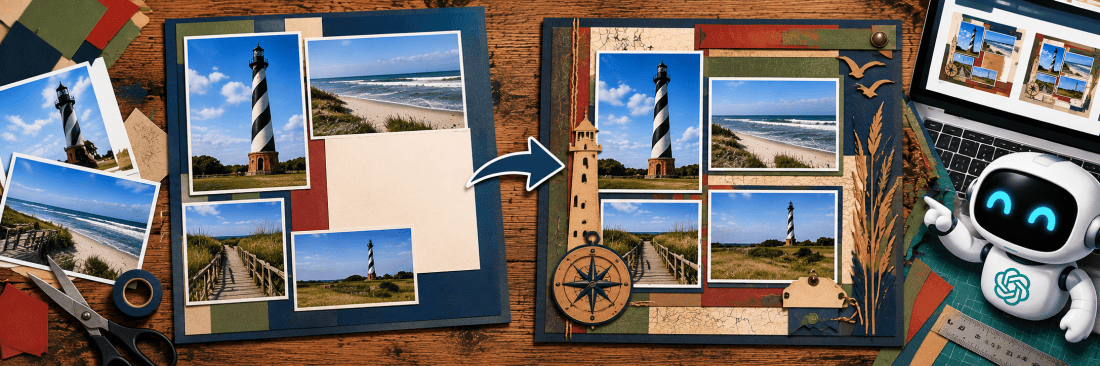
Using AI to Solve Difficult Scrapbook Layout Problems
AI in the Scrapbook Room: Article 9
If you’ve been scrapbooking for any length of time, you’ve probably experienced that frustrating moment when a layout simply isn’t coming together. You have the photographs you want to use, you’ve selected your cardstock, and you may even have a pretty good idea of how the finished page should look. But something just isn’t working.
Sometimes there’s an awkward empty space that you can’t figure out how to fill. Other times, you have a piece of memorabilia that you really want to include, but it doesn’t seem to fit anywhere. Perhaps one side of your spread looks crowded while the other looks empty, or you’ve already started cutting cardstock and suddenly realize that your original plan isn’t going to work.
I’ve certainly encountered these situations in my own scrapbooking. In the past, my usual approach was to keep moving things around until I found an arrangement I liked. Sometimes that worked fairly quickly, but other times I spent far longer trying to solve the problem than I had anticipated. In fact my latest 7 month hiatus in Scrapbooking began when I couldn’t figure out a way to create a Six Flags over Texas layout.
This is where ChatGPT offers another possibility. Rather than asking it to design an entirely new scrapbook page, I can show it what I’ve already created, explain the problem, and ask for suggestions that work within the limitations of my existing design.
In our previous article, we explored using ChatGPT to brainstorm scrapbook layouts from scratch. This time, we’re going to approach things a little differently. We’ll start with a layout that has a problem and see whether ChatGPT can help us solve it.
I’ve identified four common challenges that scrapbookers encounter. For each one, I’m creating a short video showing how to describe the problem, ask ChatGPT for visual solutions, and refine its suggestions.
1. Dealing with Awkward Empty Spaces
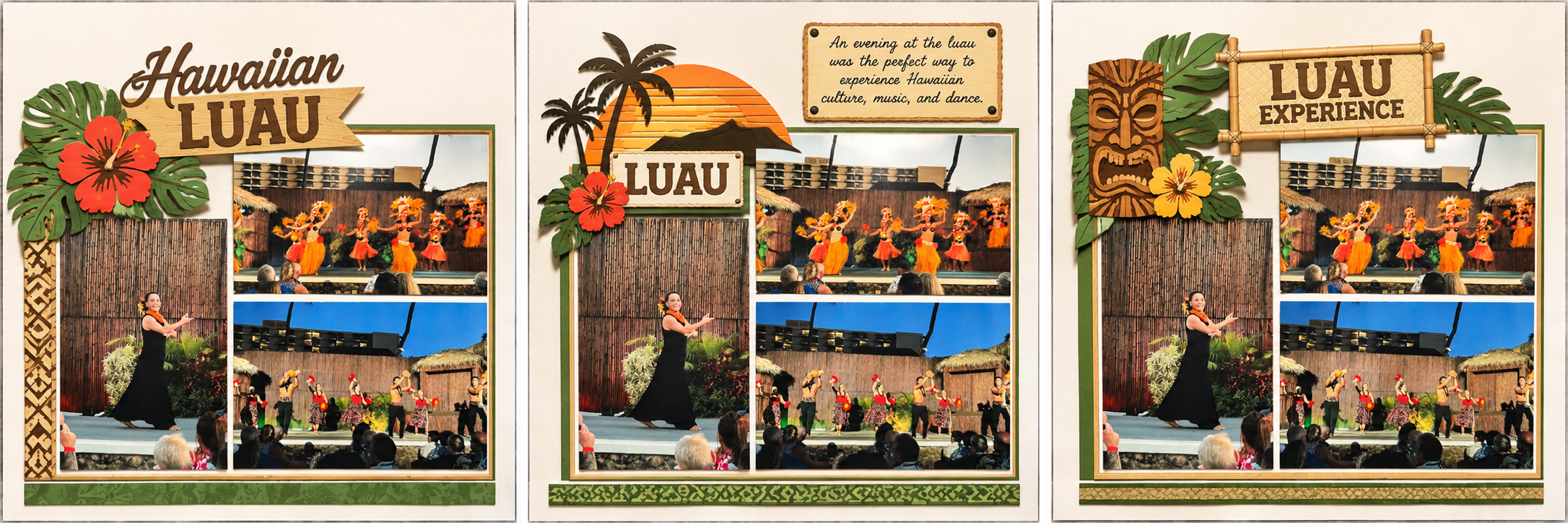
One of the more frustrating layout problems occurs when all your photographs are arranged, but you’re left with an empty space that doesn’t seem to serve any purpose. Perhaps it’s a long, narrow gap between photographs, an awkward corner, or a large open area that makes the page feel unfinished.
Of course, empty space isn’t necessarily a bad thing. Sometimes it provides visual breathing room and helps draw attention to the photographs. The challenge is deciding whether the space is contributing to the design or simply making the page look incomplete.
ChatGPT can help by examining a photograph or sketch of your layout and suggesting ways to use that space. It might recommend a title, journaling block, decorative border, or embellishment that complements the existing design. It may even suggest leaving the space alone!
Try this prompt:
I’m uploading a photograph of a scrapbook layout I’m working on. The photographs are already arranged where I want them, but there’s an awkward empty space that I’m having trouble using. Please examine the layout and create three different visual mockups showing possible solutions. You can suggest titles, journaling, cardstock embellishments, or other design elements, but do not move or resize the existing photographs. Keep the overall design appropriate for a masculine scrapbook page. I want to see the proposed solutions rather than just read descriptions of them.
When you review the suggestions, consider whether the added elements actually improve the layout. It’s easy to fill an empty space simply because it’s there, but that doesn’t always produce a better design. You can also ask ChatGPT to make the suggested embellishments simpler, change their colors, or show how a different title placement might work.
Video Tutorial 1: Dealing with Awkward Empty Spaces
2. Making Room for Unusual Memorabilia
If you’ve followed my scrapbooking projects, you know that I enjoy incorporating memorabilia and ephemera into my pages. Tickets, brochures, restaurant menus, programs, maps, and other keepsakes can add a great deal to the story I’m preserving.
Unfortunately, these items don’t always cooperate with the layout I’ve planned. A long, narrow ticket might be difficult to position alongside photographs, while a large program or brochure could occupy more space than I anticipated. Sometimes the memorabilia is particularly meaningful, and I don’t want to leave it out simply because it’s an inconvenient size.
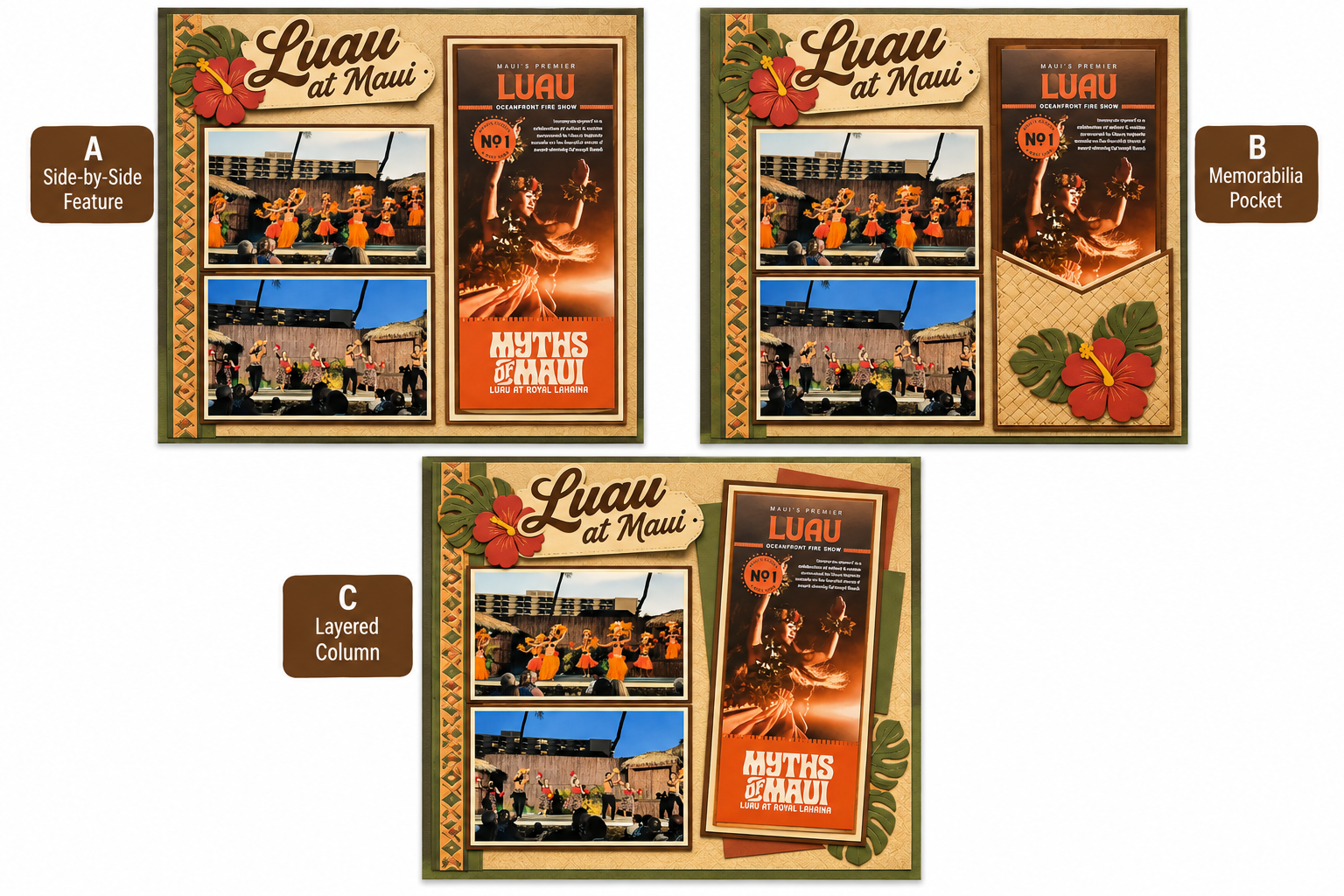
ChatGPT can help explore ways to incorporate these items into an existing layout. By uploading a photograph of the page and, if necessary, a separate image of the memorabilia, you can ask it to suggest several different arrangements.
Try this prompt:
I’m uploading a photograph of a scrapbook layout and a separate photograph of a piece of memorabilia that I want to include. The memorabilia measures approximately 4 inches wide by 9 inches tall, and the scrapbook page is 12 by 12 inches. Please create three visual mockups showing different ways to incorporate the memorabilia into the existing layout. Try to preserve the current photograph arrangement as much as possible. You may suggest repositioning embellishments, creating a pocket, or using a different orientation for the memorabilia, but do not crop or alter the original item. Show me the proposed layouts visually.
One possibility worth exploring is whether the memorabilia needs to be displayed in its entirety. A folded brochure might fit into a pocket, while a program could be attached in a way that allows someone to lift or open it. A photocopy may also be an option if you want to preserve the original elsewhere. The important thing is to explain what matters most to you. If the entire item must remain visible, tell ChatGPT. If it can be folded or placed in a pocket, that opens up additional possibilities.
Video Tutorial 2: Making Room for Unusual Memorabilia
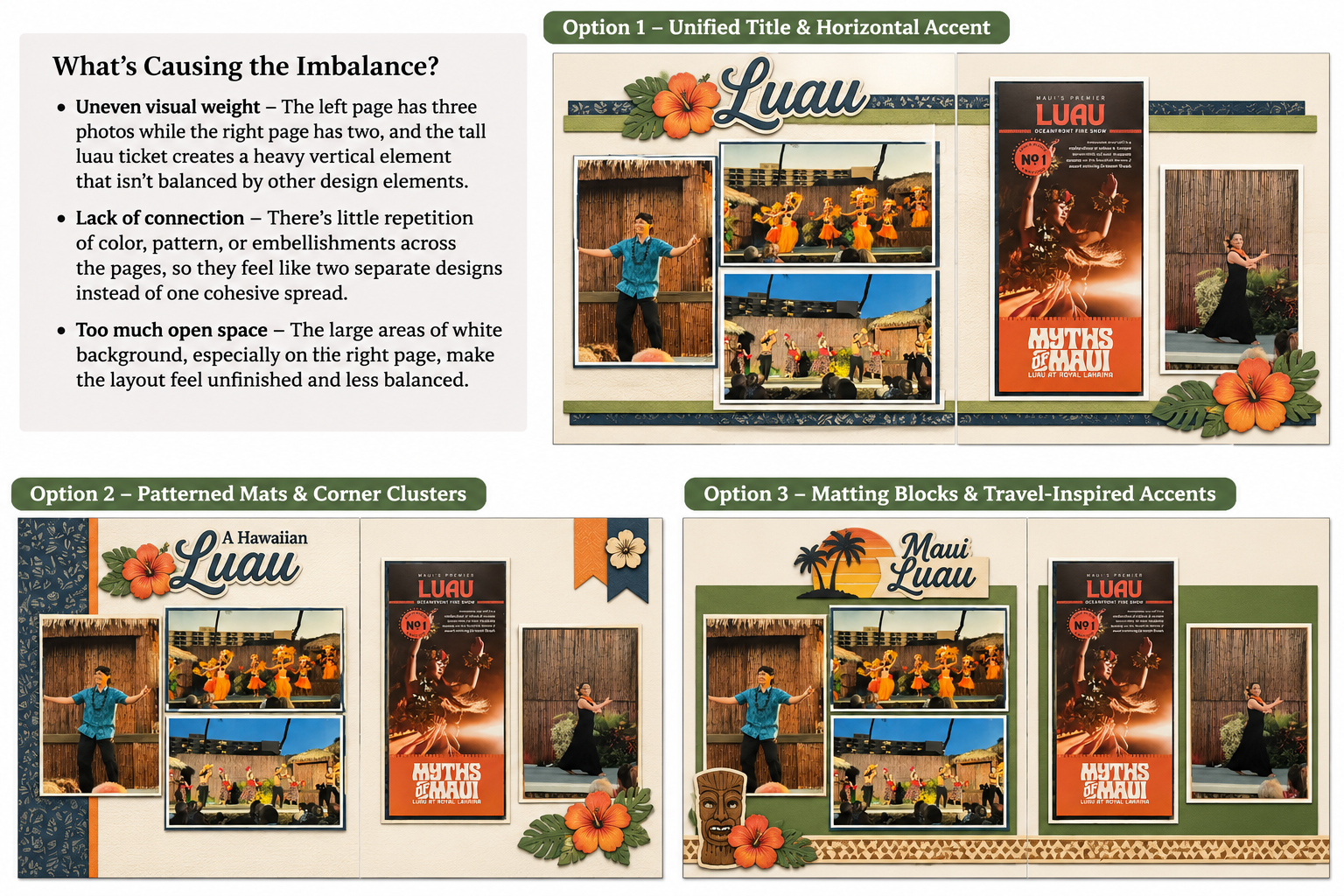
3. Fixing an Unbalanced Layout
Sometimes a scrapbook layout contains all the right elements but still doesn’t look quite right. You might have several photographs clustered together on one side, while the other side feels relatively empty. A large title or embellishment might draw too much attention away from the photographs, or the colors and decorative elements might make one part of the page feel heavier than another.
This can be especially noticeable when creating two-page spreads. Since I frequently work with two 12-by-12-inch pages side by side, I want them to feel like parts of the same composition, even when the photographs and embellishments aren’t arranged symmetrically.
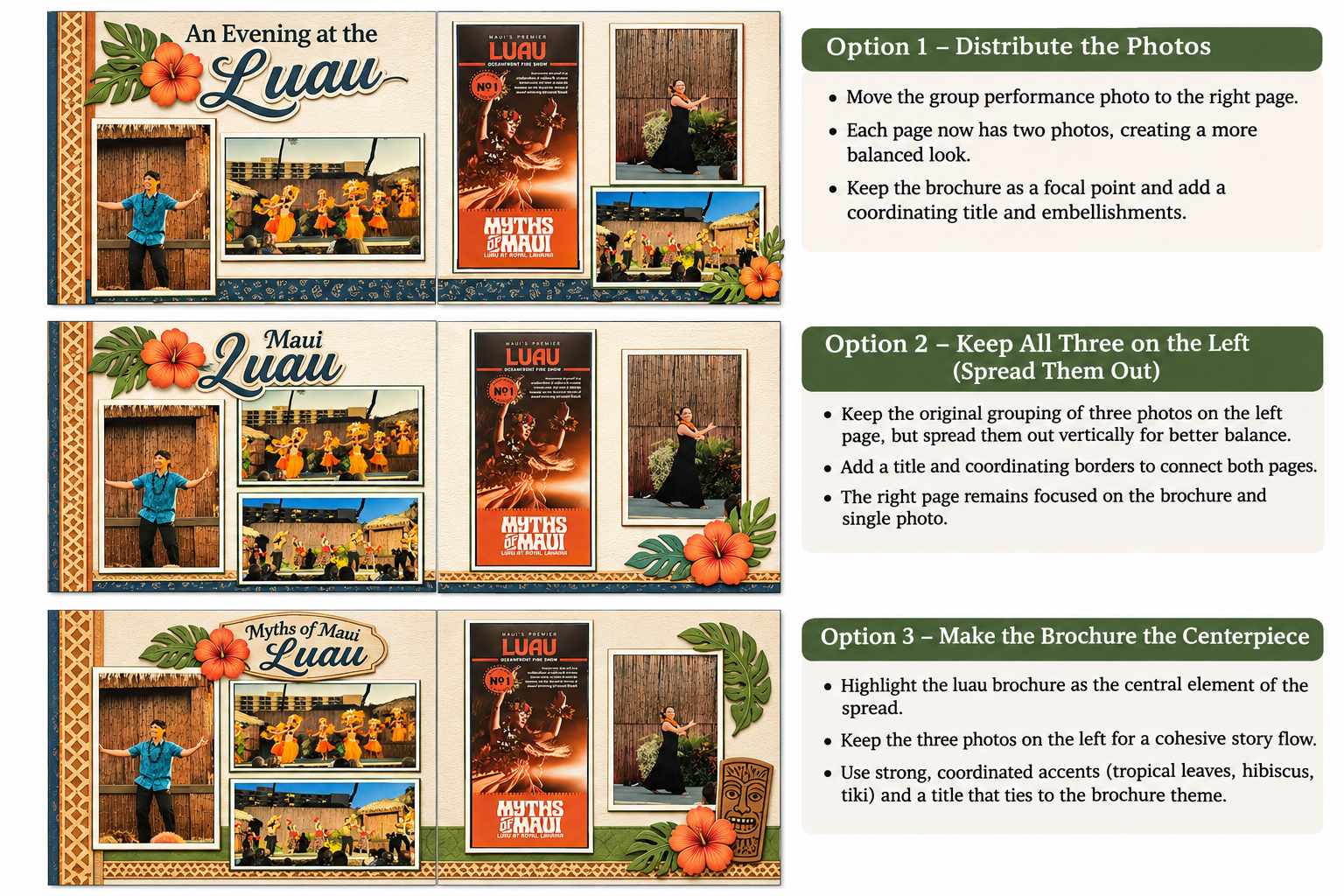
ChatGPT can examine a photograph of your layout and suggest adjustments that improve the overall balance. It might recommend moving a title, changing the size of an embellishment, redistributing accent colors, or creating a visual connection between the two pages.
Try this prompt:
I’m uploading a photograph of a two-page scrapbook spread. Each page measures 12 by 12 inches. Something about the overall design feels unbalanced, but I’m having trouble identifying the problem. Please examine the layout and explain briefly what might be causing the imbalance. Then create three visual mockups showing different ways to improve the design. Try to preserve the photograph positions, but you may suggest changes to titles, embellishments, cardstock accents, and other decorative elements. I want the two pages to feel coordinated without necessarily being identical.
This is one situation where I think it can be particularly helpful to ask ChatGPT for a brief explanation of its recommendations. Understanding why a layout feels unbalanced may help you recognize similar issues in future projects. You also don’t have to accept every suggestion. Perhaps you intentionally want one side of the spread to be more prominent, or you prefer an asymmetrical design. ChatGPT can offer another perspective, but the final decision remains yours.
Video Tutorial 3: Fixing an Unbalanced Layout
4. Rescuing a Layout That’s Already Underway
This may be the most frustrating situation of all. You’ve already spent time cutting cardstock, assembling photo mats, or attaching embellishments, and then you realize something isn’t working.
Perhaps a photograph doesn’t fit where you intended, a title takes up more room than expected, or an embellishment that looked great on the computer doesn’t work nearly as well once you’ve cut it out. At this point, starting over might mean wasting materials and undoing work you’ve already completed.
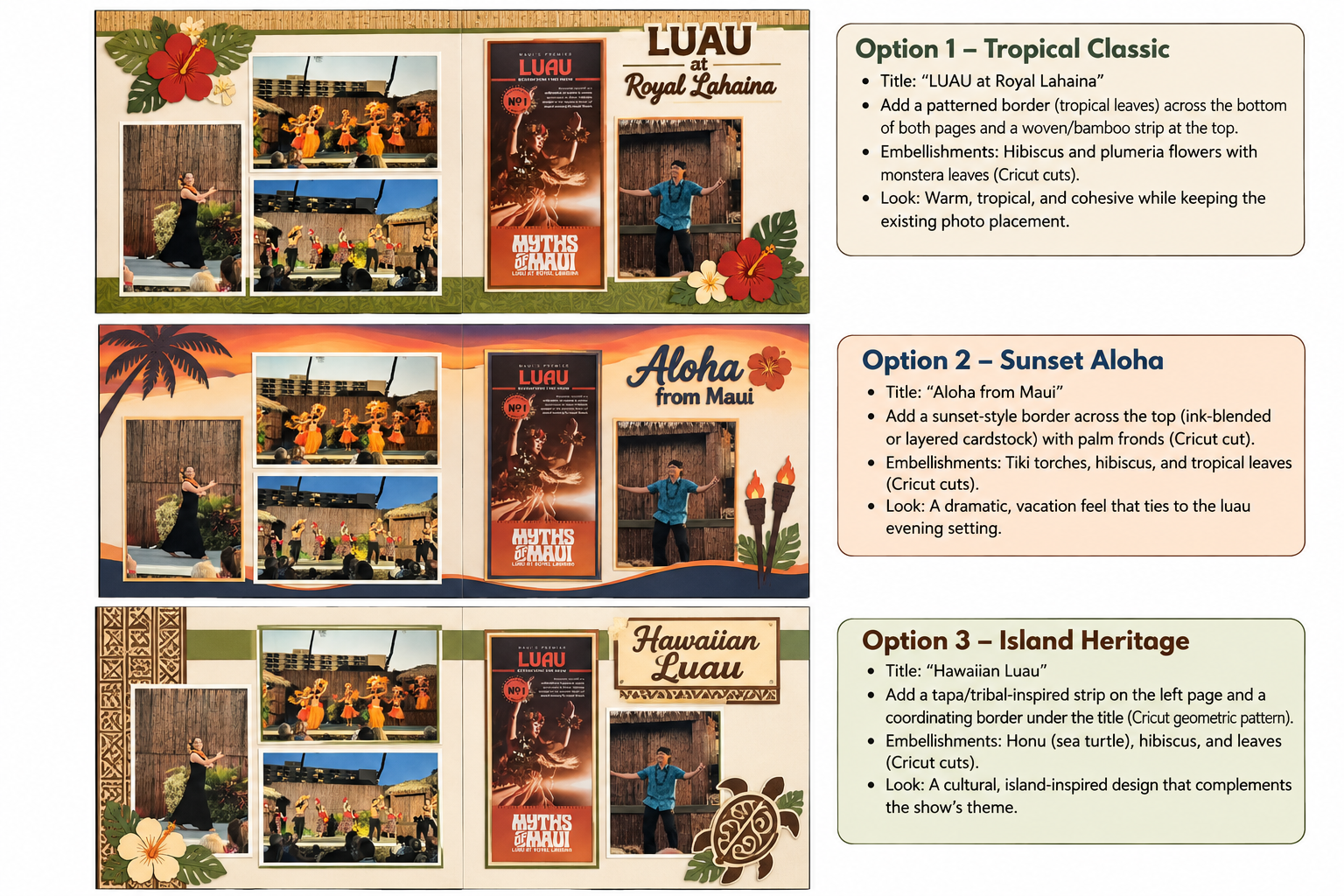
One of the interesting possibilities with ChatGPT is asking it to solve a design problem while respecting the parts of the layout that cannot be changed. For example, if you’ve already glued down several photographs, you can explain that their positions are fixed. If you’ve cut a large cardstock embellishment, you can ask ChatGPT to find a way to incorporate it rather than designing something completely different.
Try this prompt:
I’m uploading a photograph of a scrapbook page that I’ve already started assembling. Some elements are permanently attached, and I don’t want to start over. The photographs and photo mats must remain exactly where they are, but I can still change the title, embellishments, and any unattached cardstock pieces. Please examine the layout and create three visual mockups showing ways to improve the design while preserving everything that’s already attached. Do not suggest removing or repositioning the fixed elements. Focus on practical solutions that I could accomplish with cardstock and my Cricut.
You can make this prompt even more effective by identifying exactly which elements are attached and which can still be moved. You might also tell ChatGPT what additional cardstock colors you have available or whether you’re willing to cut new embellishments.
This is a good example of why the conversation matters. Your first request may produce a suggestion that looks promising but requires changing something you’ve already glued down. Rather than abandoning the idea, explain the limitation again and ask ChatGPT to revise the design.
Video Tutorial 4: Rescuing a Layout That’s Already Underway
The Importance of Explaining What Cannot Change
One of the biggest differences between brainstorming a new layout and solving a problem with an existing one is that you often have limitations.
When starting from scratch, nearly everything is flexible. You can move photographs, change the title location, select different cardstock, or completely rethink the arrangement. But once you’ve begun assembling a page, some decisions may already be permanent.
That’s why I recommend being very specific about what ChatGPT is allowed to change. Explain which photographs must remain in place, which embellishments are already attached, and whether you’re willing to cut additional cardstock. If you have a limited amount of space or need to keep an element within a particular area, provide those measurements.
I also recommend uploading a clear, overhead photograph of the entire page or spread. Try to avoid photographing the layout at an angle, since that can make it harder to judge the proportions and available space. If you’re working with a two-page spread, include both pages in the same photograph so ChatGPT can examine how they relate to each other.
As with our previous article, remember that AI-generated mockups aren’t guaranteed to be dimensionally accurate. ChatGPT may suggest an attractive solution that doesn’t actually fit, or it may inadvertently change something you specifically asked it to preserve. Always check the results against your actual layout before cutting or attaching anything.
Sometimes the Best Solution Is a Small Change
I think one of the most useful aspects of this approach is that you don’t necessarily need a completely different design. Sometimes moving a title, adding a narrow cardstock border, changing an embellishment, or adjusting the distribution of colors can make a surprising difference.
And sometimes the best solution is to leave things alone. Not every empty space needs to be filled, and not every scrapbook page needs to be perfectly symmetrical.
ChatGPT can offer possibilities, but it doesn’t know which photographs or keepsakes are most meaningful to you unless you explain that. It also doesn’t have to live with the finished page in your scrapbook album. You do!
Give It a Try!
The next time you encounter a scrapbook layout that just isn’t coming together, consider taking a photograph and asking ChatGPT for a few ideas before you start pulling things apart or cutting more cardstock.
Be specific about the problem, explain what can and cannot change, and ask for visual mockups that show possible solutions. If the first suggestions don’t work, keep refining the conversation until you find something useful.
I hope the four accompanying videos demonstrate that ChatGPT can be helpful not only when you’re starting a new project, but also when you’re trying to make an existing design work.
In our next article, we’ll explore Creating Meaningful Captions and Titles for Scrapbook Photographs. We’ll move from arranging our photographs to finding the words that help tell their stories.
In the meantime, I’d love to hear about the layout challenges you’ve encountered. Have you ever had a page that just wouldn’t come together? And would you consider asking ChatGPT for a second opinion before starting over?
Categories: AI Tips and Tricks, Articles

